
CodyChat users often want their chat room to look more modern and visually attractive. One of the easiest ways to improve the look of your community is by styling the Topic Log links so they stand out.
If you share announcements, updates, or external links inside your Topic Log, a normal blue link can look dull.
A better option is to use Snapchat-style neon yellow links—bright, eye-catching, and perfect for drawing user attention inside CodyChat.
This guide explains how to add neon yellow glowing links specifically inside CodyChat topic logs, using a small CSS snippet.
Why Use Neon Yellow Links in CodyChat?
Inside CodyChat, the Topic Log appears at the top of the chat and is the first thing users see. If you place any link there—forum link, update post, event announcement—your goal is that users should actually notice and click it.
Neon yellow links help because they:
- Stand out immediately in light and dark themes
- Match Snapchat’s modern UI look
- Improve the overall design of CodyChat
- Increase user interaction and clicks
- Make announcements and community links more visible
Snapchat-Style Neon Yellow Link CSS (CodyChat-Ready)
Add this CSS to your CodyChat custom.css or your active theme’s stylesheet:
.topic_log .tptext a {
    color: #FFFC00 !important;     /* Snapchat Yellow */
    font-weight: bold;
    text-decoration: none;
    cursor: pointer;
    text-shadow: 0 0 6px rgba(255, 255, 0, 0.8);  /* Neon glow */
    transition: 0.2s ease-in-out;
}

.topic_log .tptext a:hover {
    text-shadow: 0 0 10px rgba(255, 255, 0, 1);   /* Stronger glow */
    opacity: 0.9;
    text-decoration: underline;
}
Where to Add This in CodyChat?
You only need to add the CSS in one place:
1. custom.css
Located in:
css/custom.css
Paste the CSS at the bottom of the file, save, and refresh your chat room.
There is no need to edit HTML, PHP, or javascript files.
It works directly inside CodyChat’s built-in structure.
How It Works Inside CodyChat
This CSS targets:
.topic_log .tptext a
Meaning:
.topic_log→ your chat’s Topic Log.tptext→ the text area where your message + link appearsa→ only the link itself
So your normal Topic Log remains unchanged, but the link becomes:
- Bright neon yellow
- Bold
- Glowing
- Highlighted on hover
- More clickable
It blends perfectly into CodyChat’s UI and looks professional instead of distracting.
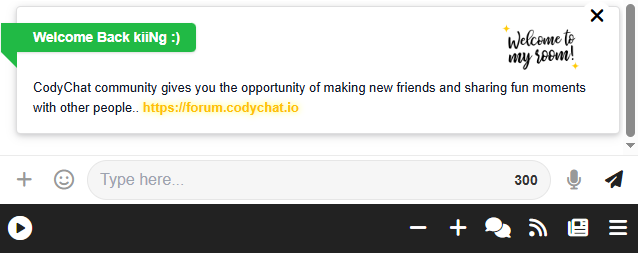
Example of How Your Topic Log Looks After This
If your Topic Log text is something like:
CodyChat community gives you the opportunity of making new friends and sharing fun moments with other people.. https://forum.codychat.io
After adding the CSS, the link looks like a glowing Snapchat-style neon highlight, grabbing instant attention.
Why This Is Useful for CodyChat Owners
If you run a CodyChat community, neon links help you:
- Promote your forum
- Highlight rules or announcements
- Share updates
- Drive traffic to your social profiles
- Make your room UI better than default themes
It’s a simple styling upgrade that improves both design and user engagement.
Conclusion
Adding Snapchat-style neon yellow links inside CodyChat topic logs is a small change with a big visual impact. Your chat room becomes more modern, your announcements get noticed faster, and users interact more with your links.
Just add the CSS once, and the glow effect applies automatically to every future Topic Log link.
for more Custom style ui check our blogs and community forums.
Features Page
Learn more about all CodyChat features here:
👉 https://codychat.io/features
Blog Page
All CodyChat updates, tutorials, and styling guides:
👉 https://codychat.io/blog
Download CodyChat
Download or update CodyChat to the latest version:
👉 https://boomcoding.com/store
Community Page
Join the CodyChat community and share ideas:
👉 https://forum.codychat.io
Themes Page
Discover new CodyChat UI themes and designs:
👉 https://codychat.io/themes
These internal links help users navigate and improve your on-site SEO score.
⭐ External Links (High Authority & Safe)
Snapchat
Learn more about Snapchat’s branding inspiration:
👉 https://snapchat.com
Mozilla Developer Docs
Understand CSS properties like hover, glow, shadow:
👉 https://developer.mozilla.org/en-US/docs/Web/CSS
Google Fonts
Explore more UI-friendly fonts for CodyChat:
👉 https://fonts.google.com